AI Automation Article
How enterprise automation transforms your digital workflows
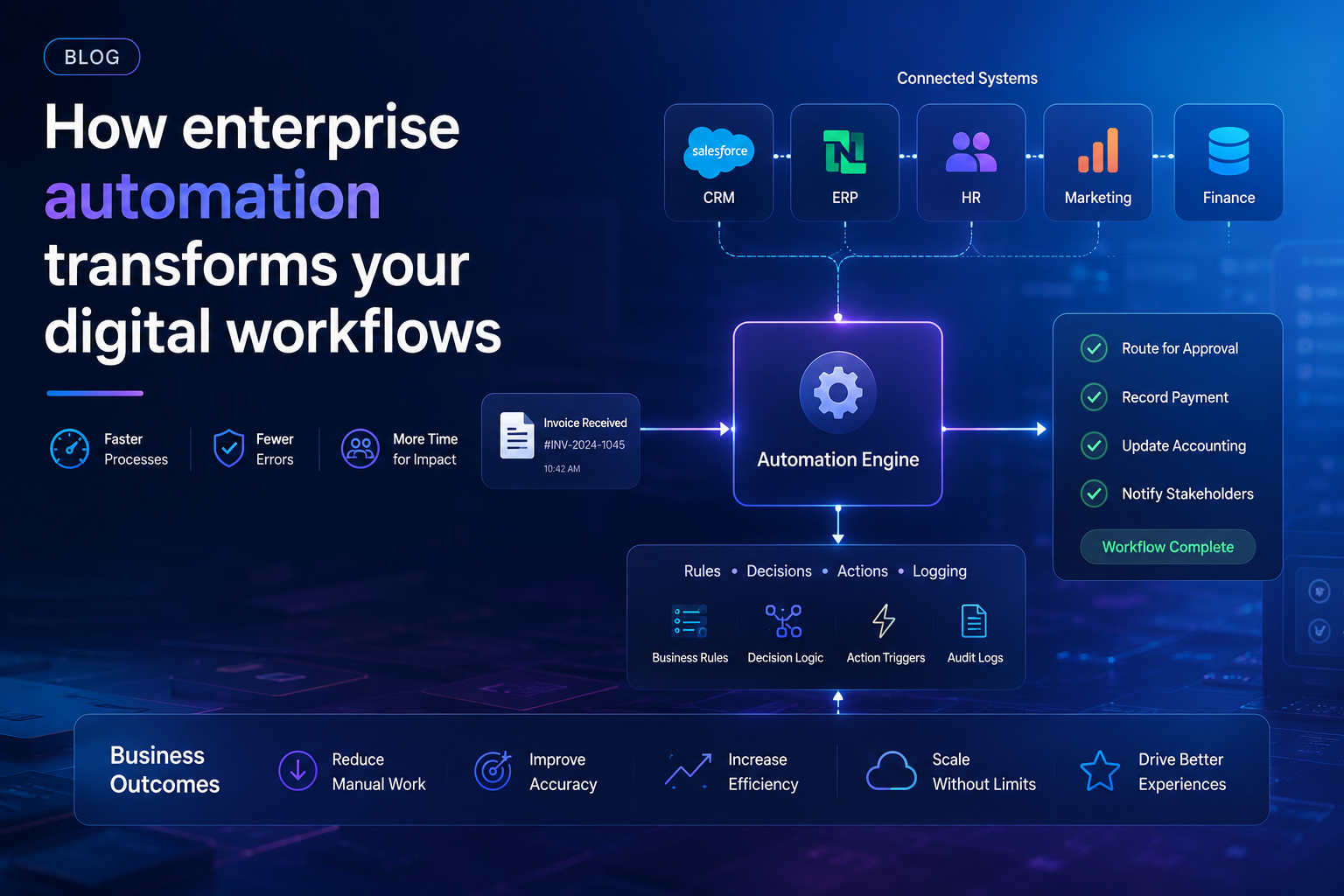
Enterprise SaaS automation services replace manual, repetitive tasks with software-driven processes. Instead of employees copying data between systems or sending routine approvals, automation handles these steps automatically. This shift changes how work flows through an organization. Tasks move faster, errors drop, and teams focus on higher-value work. Automation connects your existing tools—CRM, ERP, HR systems, marketing platforms—into a unified workflow. When a customer updates their address in one system, automation updates every other system. When an invoice arrives, automation routes it for approval, records payment, and updates accounting. These services run on cloud infrastructure, scale with your business, and integrate with your current tech stack. The result is digital workflows that operate without constant human intervention.
What is enterprise automation?
Enterprise automation uses software to execute business processes across departments. It goes beyond simple task automation. Think of it as digital workers that handle complex, multi-step workflows. These systems connect to your existing enterprise SaaS applications through APIs. They read data, make rule-based decisions, trigger actions, and log results. Enterprise automation covers everything from customer onboarding to supply chain management. The key difference from basic automation is scale and complexity. Enterprise systems handle thousands of transactions per day across dozens of applications. They include monitoring, error handling, and reporting. Modern enterprise automation platforms use low-code interfaces, enabling business teams to build and modify workflows without heavy IT involvement. This democratization means departments can automate their own processes while maintaining enterprise governance and security standards.
Basic automation isn't competitive anymore
Simple automation—email triggers, spreadsheet macros, basic chatbots—no longer provides competitive advantage. Every company has these. The market expects instant responses, personalized experiences, and zero errors. Basic tools can't deliver this at scale. They break when processes change. They require constant maintenance. They create silos instead of breaking them down. Consider customer support: basic automation sends an acknowledgment email. Modern automation resolves the issue without human touch by pulling data from CRM, knowledge bases, and previous interactions. Basic marketing automation sends batch emails. Modern automation personalizes each message based on real-time behavior across channels. Basic finance automation matches invoices to purchase orders. Modern automation predicts cash flow needs and recommends payment timing. The gap between basic and advanced automation is the difference between surviving and leading in your market. Companies still using basic automation find themselves outpaced by competitors who treat automation as a strategic capability.
Future-forward enterprises turn to agentic AI
Agentic AI represents the next evolution of enterprise SaaS automation services. Instead of following fixed rules, these systems make decisions. They observe outcomes, learn from patterns, and adjust their behavior. An agentic AI system managing IT tickets doesn't just route requests—it diagnoses problems, tests solutions, escalates only when needed, and documents the resolution. These agents operate autonomously within defined boundaries. They handle uncertainty. When a process changes, they adapt rather than break. For enterprises, this means automation that handles the 80% of cases that don't fit clean rules. Agentic AI combines large language models with your company's data and workflows. It understands context. It knows that a support ticket about "login issues" might mean different things for different user types. It can ask clarifying questions, check system logs, verify permissions, and resolve most issues without human involvement. Forward-looking companies deploy these agents across departments—HR, finance, IT, sales—creating a workforce of digital colleagues that augment human teams.
Explore 100+ examples of how Agentic AI is transforming work across the enterprise.
Agentic AI applications span every department. In HR, agents screen candidates, schedule interviews, answer benefits questions, and onboard new hires. One company reduced time-to-hire by 40% using an agent that pre-screens resumes, checks references, and coordinates interview schedules autonomously. In marketing, agents generate campaign briefs, analyze competitor content, personalize email sequences, and optimize ad spend in real time. A B2B SaaS company saw 25% higher conversion rates after deploying an agent that adjusted messaging based on prospect behavior. Finance departments use agents for invoice processing, expense report auditing, and cash flow forecasting. An enterprise with 50,000 employees automated 90% of expense report reviews, catching policy violations that humans missed. IT operations agents monitor system health, apply patches, reset passwords, and troubleshoot network issues. A financial services firm reduced incident resolution time from 4 hours to 12 minutes. Sales agents qualify leads, prepare proposals, schedule demos, and follow up with prospects. One sales team increased pipeline by 30% after deploying an agent that handled initial prospect outreach. Customer success agents monitor product usage, identify at-risk accounts, and trigger intervention workflows. These examples show agentic AI moving beyond proof-of-concept into production at scale.
Enterprise automation use cases
Enterprise SaaS automation services apply across every business function. The common thread is reducing manual work while improving accuracy and speed. Each department has its own pain points—repetitive data entry, complex approval chains, cross-system synchronization. Automation addresses these with workflows that connect people, systems, and data. The best automation projects start with a specific problem: too many manual handoffs, too much time spent on low-value tasks, too many errors from human data entry. Teams that automate these pain points see immediate returns. The following use cases show how automation works in practice across major business functions.
Human resource management
HR departments handle countless repetitive processes. New hire paperwork, benefits enrollment, time-off requests, performance reviews—each involves multiple systems and stakeholders. Enterprise automation connects your HRIS, payroll, benefits platforms, and learning management systems. When a manager approves a new hire, automation creates the employee record, sends welcome materials, schedules orientation, sets up IT accounts, and enrolls them in benefits. This reduces onboarding time from days to hours. Offboarding works similarly: termination triggers account deactivation, final paycheck calculation, equipment return instructions, and exit survey distribution. Leave management automation checks remaining balances, routes approvals, updates calendars, and adjusts payroll. Performance review automation sends reminders, collects feedback, compiles ratings, and generates review documents. The result is an HR team that spends less time on administration and more time on strategic initiatives like talent development and culture building.
Marketing
Marketing teams juggle campaigns across email, social media, web, paid ads, and events. Each channel has its own tools and data. Enterprise automation unifies these into coordinated workflows. When a prospect downloads a whitepaper, automation adds them to the CRM, assigns a lead score, triggers a nurture sequence, and notifies sales. Campaign management becomes automated: set your parameters, and the system handles scheduling, A/B testing, budget allocation, and performance reporting. Personalization at scale becomes possible. Automation pulls behavioral data from your website, email engagement, and product usage to tailor messaging for each contact. Lead scoring updates in real time as prospects interact with your content. Event marketing automation handles registration, reminders, follow-ups, and attendee segmentation. Marketing operations teams who implement automation see 20-30% increases in marketing-qualified leads while reducing manual effort by similar margins.
Finance and accounting
Finance departments process invoices, expenses, payments, and reconciliations. These tasks are high-volume, rules-based, and error-prone when done manually. Enterprise automation transforms accounts payable: invoices arrive via email or portal, automation extracts data using optical character recognition, matches to purchase orders, routes for approval based on amount and department, schedules payment, and updates the general ledger. Accounts receivable automation sends invoices, tracks payments, applies cash, and follows up on overdue accounts. Expense report automation checks receipts against policy, flags violations, routes approvals, and processes reimbursements. Month-end close, traditionally a frantic period of manual reconciliation, becomes automated. The system reconciles bank statements, matches transactions, generates adjusting entries, and produces financial statements. Companies that automate finance processes cut close times by 50-70% and reduce errors to near zero.
IT operations
IT teams manage user accounts, software licenses, security permissions, and infrastructure. These tasks multiply as companies grow. Enterprise automation handles user lifecycle management: when HR creates an employee record, automation provisions accounts in Active Directory, email, VPN, and all required SaaS applications. When someone changes roles, automation updates permissions across systems. Password resets, the most common IT request, become self-service through automated verification and reset workflows. Software license management automation tracks usage, identifies unused licenses, and recommends reallocation or cancellation. Security automation monitors for threats, applies patches, and enforces compliance policies. Incident management automation triages tickets, checks knowledge bases for solutions, routes to appropriate teams, and escalates based on severity. IT teams using automation reduce ticket volume by 30-50% and resolve remaining tickets faster.
Sales
Sales teams spend too much time on non-selling activities: data entry, research, scheduling, follow-ups. Enterprise automation reclaims this time. Lead management automation captures leads from all sources, enriches with external data, scores based on fit and intent, and routes to the right salesperson. Sales engagement automation sequences emails, calls, and social touches based on prospect behavior. When a prospect visits the pricing page, automation triggers a follow-up email. When they open it, the system schedules a call reminder. Proposal generation automation pulls product configurations, pricing, and terms into professional documents. Contract management automation routes for legal review, tracks approvals, and manages renewals. Sales forecasting automation pulls pipeline data, applies historical conversion rates, and predicts revenue by period. Sales teams that implement automation see 15-20% increases in time spent selling and corresponding revenue growth.
Choosing the right enterprise automation solution
Selecting enterprise SaaS automation services requires matching capabilities to your specific needs. Start by mapping your current processes. Identify bottlenecks, manual steps, and error-prone activities. This map becomes your requirements document. Look for platforms that connect to your existing tool stack through APIs and pre-built connectors. Evaluate ease of use—can business users build workflows without coding? Consider scalability: will the platform handle your transaction volume as you grow? Security matters: the platform should support role-based access, audit trails, and compliance certifications. Pricing models vary: per-transaction, per-user, or per-workflow. Calculate total cost including implementation, training, and ongoing support. Request demonstrations showing similar use cases to yours. Talk to reference customers about their experience. The right solution grows with you, adapts to process changes, and delivers measurable ROI within months.
Implement enterprise automation to improve your business processes
Implementation starts with a pilot project. Choose a process that's painful but contained—something that takes your team hours each week but has clear rules. Automate this process end-to-end. Measure the time saved and error reduction before and after. This proof of concept builds confidence and reveals integration challenges. Expand gradually. Add more workflows, connect more systems, involve more departments. Train your team on the automation platform. Encourage them to identify processes for automation. Create a center of excellence to govern automation standards, share best practices, and manage the automation portfolio. Monitor performance: track throughput, error rates, and business outcomes. Continuously improve workflows as processes change. Enterprise automation is not a one-time project but an ongoing capability. Companies that treat it this way see compounding returns as automated processes create data that enables further automation and optimization.
Related articles
Moveworks Achieves ISO/IEC 42001 Certification
Moveworks, a leader in enterprise AI automation, received ISO/IEC 42001 certification for its AI management system. This standard specifies requirements for establishing, implementing, maintaining, and continually improving an AI management system within organizations. The certification confirms Moveworks meets international benchmarks for responsible AI deployment, risk management, and governance. For enterprise customers, this certification provides assurance that the AI systems handling their workflows operate transparently and ethically. ISO/IEC 42001 covers AI-specific considerations including bias mitigation, transparency, accountability, and continuous monitoring. Moveworks' certification process included rigorous auditing of their AI development lifecycle, data handling practices, and deployment protocols. This achievement positions Moveworks as a trusted partner for enterprises concerned about AI governance and compliance.
Employee Self-Service Automation for Enterprise Support
Employee self-service automation transforms how employees get help from IT, HR, and facilities teams. Instead of submitting tickets and waiting for responses, employees interact with automated systems that resolve common issues instantly. Password resets, software access requests, benefits questions, and office supply orders become self-service workflows. The automation handles verification, approval routing, and fulfillment without human intervention. For employees, this means instant resolution of routine needs. For support teams, it means reduced ticket volume and more time for complex issues. Modern self-service platforms use natural language processing so employees can describe their needs in plain language. The system understands intent, checks knowledge bases, and executes actions. Employee satisfaction increases while support costs decrease.
ITIL AI: How AI Is Modernizing ITIL 4 for ITSM
ITIL 4 provides best practices for IT service management. AI is modernizing these practices by automating service desk operations, incident management, and change management. AI-powered systems can categorize tickets, diagnose common issues, and resolve them automatically. For incident management, AI analyzes historical data to predict potential incidents and recommend preventive measures. Change management benefits from AI that assesses risk, identifies dependencies, and recommends approval paths. Knowledge management improves as AI systems automatically capture resolutions and update knowledge bases. The combination of ITIL frameworks with AI capabilities creates ITSM processes that are faster, more consistent, and more scalable than traditional approaches.
The AI Assistant platform for your entire workforce
Enterprise SaaS automation services reach their full potential when delivered through an AI assistant platform accessible to every employee. This platform becomes the single interface for all automated workflows. Employees interact through chat, voice, or embedded interfaces. The platform understands natural language, knows each user's role and permissions, and executes complex workflows across systems. It handles routine requests—"reset my password," "submit my expense report," "find the nearest available conference room"—and complex ones—"create a project plan for the Q3 product launch with milestones and resource assignments." The platform learns from each interaction, improving its accuracy and expanding its capabilities. For enterprises, this means automation that's not just powerful but usable. Every employee becomes more productive without learning new tools or processes.
Products
The AI assistant platform includes several products. The core assistant handles natural language understanding and workflow execution. Integration connectors link to major enterprise systems: Salesforce, Workday, ServiceNow, SAP, Microsoft 365, Google Workspace, and hundreds more. Workflow builder lets business users create and modify automated processes. Analytics dashboard shows automation performance, usage patterns, and ROI. Security module provides role-based access, audit logging, and compliance reporting. Developer tools enable custom integrations and advanced workflows. Each product works independently or together as a complete automation platform.
Solutions
The platform offers solutions tailored to specific business functions. HR solution automates employee lifecycle processes. IT solution handles service desk and infrastructure management. Finance solution processes invoices, expenses, and payments. Sales solution manages leads, proposals, and forecasts. Marketing solution orchestrates campaigns and personalization. Customer success solution monitors health scores and triggers interventions. Each solution includes pre-built workflows, integrations, and best practices for that function. Organizations can start with one solution and expand as they see results.
Resources
Resources support every stage of the automation journey. Documentation covers installation, configuration, and customization. Training programs certify administrators and workflow builders. Community forums connect users who share tips and solutions. Professional services help with complex implementations. Support provides technical assistance and troubleshooting. Case studies show real results from enterprise deployments. ROI calculators help build business cases. White papers explore automation trends and best practices. These resources ensure organizations maximize value from their automation investment.
Company
The company behind the platform focuses on enterprise automation. Founded by veterans of enterprise software and AI, the company has grown to serve hundreds of enterprise customers. The team includes experts in natural language processing, workflow automation, enterprise integration, and security. The company's mission is to make enterprise automation accessible to every employee. Product development follows customer feedback and market needs. The company maintains partnerships with major enterprise software vendors and cloud providers. Financial backing from leading venture capital firms supports continued innovation and growth. The company's commitment to security, compliance, and customer success makes it a trusted partner for enterprise digital transformation.